In professional video work, a dependable SDI test pattern generator helps verify signal integrity, test eyes diagrams, and calibrate displays. This guide highlights five relevant products that pair SDI/HDMI conversion, test patterns, and monitoring capabilities to support broadcast, production, and AV setups. Each entry includes core features, an image, and a direct Amazon link for quick comparison.
Summary of chosen products
| Product | Primary Benefit | Key Feature |
|---|---|---|
| gofanco Prophecy SDI to HDMI Converter Scaler | On-screen control and test patterns | 3.5″ LCD, eye diagram, SDI loopout |
| ez-HSV+ HDMI to SDI Converter | HDMI to SDI with scaling | Dual SDI outputs, 480i–1080p |
| WANLUTECH IP Camera Tester | Comprehensive camera testing | 5.4″ touch screen, CVI/CVI/SDI support |
| DECIMATOR MD-Cross V2 | Cross-conversion between HDMI and SDI | Bi-directional converters |
| ACEIRMC Graphic Transistor Tester Kit | Electronics component tester | Transistors, MOSFETs, diodes, capacitors |
gofanco Prophecy SDI to HDMI Converter Scaler

The gofanco Prophecy combines 3G/HD/SD-SDI to HDMI conversion and scaling with a 3.5” LCD for on-device monitoring. It supports up to 1080p at 60Hz and offers an SDI loopout for pass-through, plus stereo audio extraction (PCM up to 8 channels). OSD controls enable quick resolution and image adjustments. Its eye diagram feature helps verify input signal integrity, and it can generate a range of test patterns to validate displays and cabling. Firmware updates are available via Micro-USB, ensuring ongoing compatibility with new standards.
Key features include a compact onboard display, flexible output options, and an integrated test pattern generator. This unit is well-suited for field testing, monitor calibration, and critical signal integrity checks in studio or live environments. It can be used as a practical SDI test pattern source and as a reliable HDMI upscaler in a small workflow.
ez-HSV+ HDMI To SDI Converter With Display

The ez-HSV+ converts HDMI to Dual SDI and includes an integrated display and scaler. It accepts HDMI input and provides two SDI outputs, along with analog stereo audio. Its adaptable resolution range spans from 480i to 1080p, making it versatile for a variety of HDMI sources and monitoring setups. The device is convenient for broadcasters needing reliable conversion, waveform alignment, and synchronization across two SDI channels, while preserving audio and enabling clean signal routing in multi-display environments.
Highlights include dual SDI outputs for redundancy or multi-display layouts, simple scaling, and compatibility with older and newer video formats. The built-in scaler helps align timelines and feed downstream equipment without adding extra processing hardware. This makes it a practical choice for AV productions, rental houses, and small studios seeking straightforward HDMI-to-SDI conversion with monitoring support.
WANLUTECH Upgraded IP Camera Tester
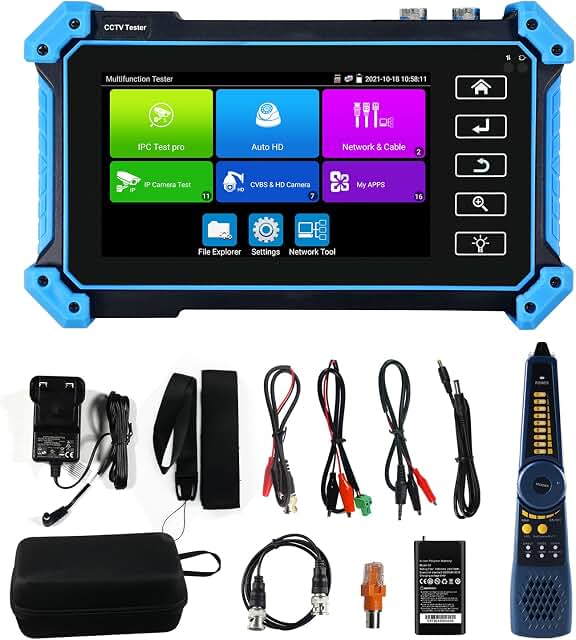
The WANLUTECH camera tester is a multifunction device for CVI/CVI/AHD/SDI analog camera testing, with a 5.4″ IPS touchscreen and PTZ/RS485 controls. It supports IP discovery, RTSP streaming, and a suite of testing modes including UTC control and OSD menu access. The unit outputs 8MP TVI/CVI/AHD/SDI camera testing and offers HDMI and VGA inputs for broader compatibility. It includes a built-in battery and PoE capabilities, enabling mobile testing without constant power connections.
Advanced features cover device discovery, batch camera activation, IP address configuration, and on-device reporting. The tester supports multiple preview windows and synchronized multi-camera viewing, making it suitable for on-site diagnostics, installation verification, and technician training. Its comprehensive toolkit supports professionals who need detailed signal testing across diverse camera ecosystems in one handheld device.
DECIMATOR MD-Cross V2 Cross Converter

The DECIMATOR MD-Cross V2 provides miniature cross-conversion between HDMI and SDI. It can HDMI-to-SDI, SDI-to-HDMI, or HDMI-to-HDMI, while also offering SDI-to-SDI and HDMI-to-SDI routing. This compact device enables flexible signal workflow, allowing users to convert between formats as needed in a live or studio environment. The cross-conversion capability supports a range of configurations, reducing the need for multiple separate interfaces and simplifying rack space usage.
Use cases include matching legacy equipment with modern displays, testing different feed paths, and integrating legacy SDI workflows with contemporary HDMI monitors. The MD-Cross V2 is a lightweight, portable option for engineers and operators who require reliable, on-the-go signal conversion across multiple standards in one unit.
ACEIRMC Graphic Transistor Tester Kit

The ACEIRMC Mega 328 Graphic Transistor Tester kit is a comprehensive electronics tester featuring automatic detection of transistors, MOSFETs, diodes, and capacitors. It provides detailed readings such as base-emitter voltage, forward voltage, and transistor amplification. The device includes a color LCD display and a protective case, offering a portable way to diagnose components and verify part characteristics in repair or development work. While not a video tool, its utility lies in validating electronic components used in test equipment, cameras, and related hardware.
Buying Guide
- Signal path and compatibility: If you need HDMI to SDI or SDI to HDMI, ensure the device supports the desired direction and the appropriate SDI formats (3G/HD/SD). A scaler or test pattern generator is valuable for calibration and troubleshooting.
- Onboard monitoring: Units with an LCD or OSD controls simplify setup and quick checks on-site. Look for eye-diagram tools and test patterns to diagnose signal integrity.
- Output options: Consider devices with loopouts, dual SDI outputs, or multiple HDMI outputs for flexible monitoring, testing, and distribution in live environments.
- Power and portability: Battery or integrated power options and compact form factors are beneficial for field work, remote shoots, or small control rooms.
- Firmware and updates: Micro-USB or USB-C firmware updates extend device life by supporting new formats and features as broadcast standards evolve.
- Additional testing tools: Some models include advanced features like PTZ control, RS485, or cross-conversion capabilities. Weigh these against your workflow needs to avoid overpaying for unused features.
- Support and reliability: Choose brands with solid documentation and software support, especially for professional environments where uptime is critical.