Yes—these desk clamp power stations streamline charging and reduce cable clutter. This guide highlights five top options ideal for home offices, dorms, and compact desks. Choose this if you want secure edge mounting, multiple outlets, and USB charging in a single, organized hub. Best for spaces where desk surface real estate is precious or you need semi-permanent, semi-hidden power access.
Below is a quick overview of the five selected products, focusing on the strongest use cases and notable limitations.
| Product | Best For | Key Feature |
|---|---|---|
| Jgstkcity Desk Clamp Power Strip (B0BXP2ZTWB) | Edge-mounted power with multiple PD USB-C ports | 40W total, 4 PD 20W USB-C ports, 5 outlets |
| Acozvin Flat Plug Desk Clamp Power Strip (B0CNVRMYMR) | High device count, compact edge mount | 17-in-1, 8 USB ports, 4 USB-C PD ports |
| Mifaso PD30W Desk Clamp (B0DCZFXDDS) | MacBooks and high-demand devices | PD30W USB-C, 4 outlets, 2 USB-C, 2 USB-A |
| Anker Nano Power Strip (B0FFGZH2S2) | Clean desk with multiple zones of power | 70W USB-C fast charging, 6 AC outlets, 2 USB-C, 2 USB-A |
| HOPOW Dual Layer Desk Clamp (B0CP8RTXGR) | Large accessory loads with surge protection | 1700J surge, 13 AC outlets, 4 USB ports |
Jgstkcity Desk Clamp Power Strip, 40W Total

The Jgstkcity unit offers a desk edge mount with a semi-permanent clamp. It provides 4 PD USB-C ports (20W each) and additional USB-A and AC outlets for a total 40W output. It is best for users who need fast charging on multiple USB-C devices at the edge of a desk. The product notes an energy rating of 1200 Joules and a fireproof housing for added protection. A potential limitation is that the total 40W is shared across all ports, so simultaneous full-speed charging on every port is not possible.
Flat Plug Desk Clamp Power Strip 10Ft, 40W

This model emphasizes a high port count, combining 9 AC outlets with 8 USB ports in a compact desktop power station. It supports 40W total output across two PD USB-C ports and multiple USB-A/C ports. It is better for users needing to charge many devices at once without buying separate adapters. A caveat is that the 40W split means not all USB-C ports will deliver maximum power when many ports are used simultaneously.
Mifaso PD30W Desk Clamp Power Strip

The Mifaso unit focuses on fast USB-C PD charging, with up to 30W on the PD port and 4 total outlets (two USB-C and two USB-A). It is suitable for users who need a dedicated high-speed USB-C port for a laptop or tablet while maintaining multiple other devices. A limitation is that when more USB ports are in use, the individual port output can be distributed to maintain safety, potentially reducing peak charging speed on some ports.
Anker Nano Power Strip, 70W USB-C
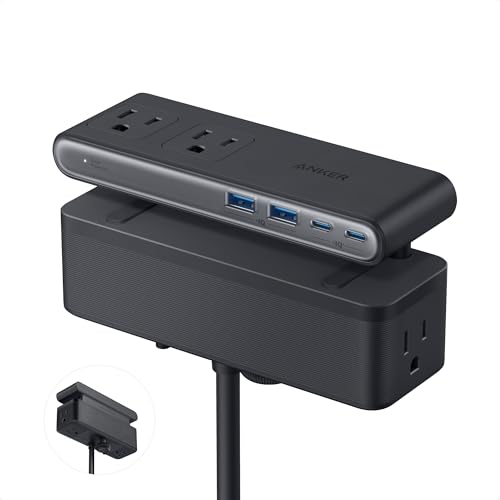
The Anker Nano emphasizes two zones and a GaN-based 70W USB-C fast charging capability, suitable for rapid laptop charging and sleek desk organization. It features six AC outlets plus two USB-C and two USB-A ports. This is best for users who want fast USB-C charging with a cleaner look and a multi-zone layout. A potential limitation is longer power data lines may create more cable management considerations on very small desks.
HOPOW Dual Layer Desk Clamp Power Strip

The HOPOW unit uses a dual-layer design with 13 AC outlets and 4 USB ports, plus a 1700 Joules surge protector and a 15A overload switch. It is well-suited for users who require many outlets and strong surge protection. The clamp fits desks up to about 2.75 inches thick. A caution is that the top and bottom sections can be separated for different mounting configurations, which may affect stability if not used as intended.
Buying Guide
What to consider when choosing a desk mount power station
Desk compatibility: Check edge thickness and clearance. Some clamps specify a maximum desk thickness and distance from the wall to avoid clearance issues.
Power needs: Count the devices you plan to charge. If you have many USB-C devices, favor units with multiple PD ports and higher total wattage.
Surge protection: Look for Joule ratings and overload protection to shield equipment from spikes.
Safety: Choose fire-retardant materials and certifications. Ensure the unit includes a thermal or overcurrent safety feature.
Cable management: Consider the arrangement of ports (zones, USB-A vs USB-C) and whether you prefer a single long cord or multiple access points.
Port layout and performance considerations
PD charging: A higher PD wattage (like 20W per USB-C port) supports faster charging for compatible devices. If you need to power a laptop, confirm the PD output per port and total limits.
Total wattage: Remember that many units cap total output (for example, 40W or 70W). Using all ports at maximum simultaneously may reduce per-port speed.
USB port types: USB-C PD ports are ideal for modern devices; USB-A ports can still be useful for older gadgets or hubs.
Installation and durability tips
Follow manufacturer guidance for desk edge placement and clearance. Ensure the clamp is tightened properly to prevent movement during cable rearrangement.
Keep high-wattage equipment away from heat sources. Ensure the housing material is rated for heat resistance and fire safety.
FAQ
- What is a desk clamp power station? A power strip that mounts to the edge of a desk, typically with multiple outlets and USB ports, designed to reduce cable clutter and keep charging locations accessible.
- Do desk clamp power strips provide surge protection? Many models include surge protection with Joule ratings to guard connected devices. Check the specification for the exact rating and protection features.
- Can I charge a laptop from these devices? Yes, if the unit offers USB-C PD ports with sufficient wattage and a compatible laptop. Verify per-port and total wattage to ensure fast charging.
- Will using multiple USB ports affect charging speed? Often yes. Total wattage is shared among ports, so using many ports simultaneously may reduce the charging speed on individual ports.
- Is installation permanent? Desk edge clamps are semi-permanent; they can be removed if needed but may leave marks or require clean-up depending on the desk surface.
- What desk sizes are these compatible with? Most edge clamps fit desk edges up to about 1.6–1.96 inches thick; some models accommodate thicker desktops with adjustable clamps.